Real-time AI detection, collision warnings, a full web dashboard, and integrations that fit your setup. All running locally on your hardware.
A custom maritime AI model trained to detect and classify 6 object types in real time
Continuous trajectory analysis with multi-level alerts so you can react before it's too late
Monitors proximity of detected objects relative to your vessel in real time.
Tracks whether an object's relative position is changing — a constant bearing means collision course.
Swimmers and debris are weighted higher than large vessels. The system knows what matters most.
A full control interface accessible from any browser on your local network
Real-time video with detection overlays, fullscreen mode, and RAW/processed toggle
Live frames-per-second readout so you always know system performance
Number of objects currently being tracked, updated in real time
Shows Online/Offline state and current execution mode (TensorRT/CPU)
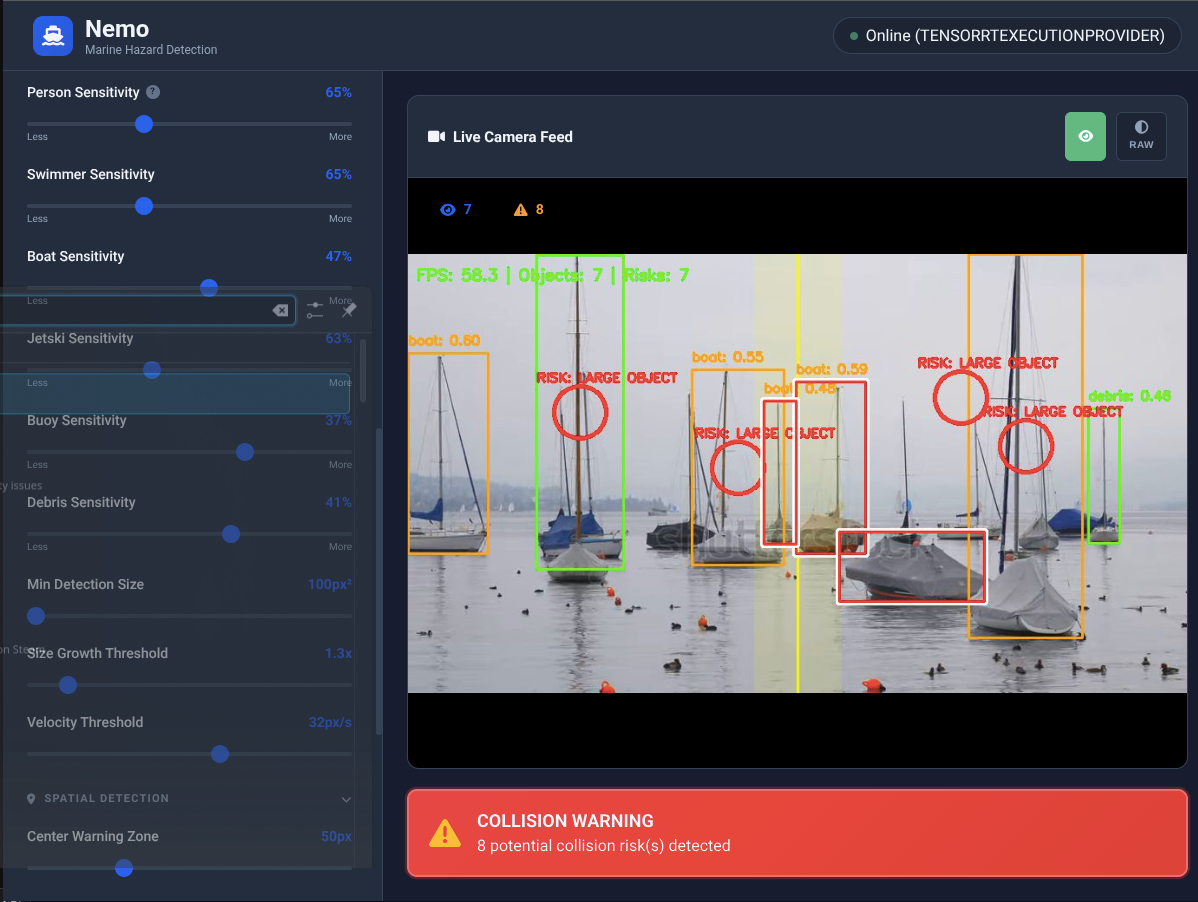
Configurable settings to optimize detection for any lighting or weather condition
Toggle between the raw camera output and the AI-enhanced processed view. The processed view applies gamma correction, CLAHE contrast enhancement, and brightness adjustments — optimized for the best possible detection accuracy.
Use RAW mode for troubleshooting camera issues or comparing detection performance under different conditions.
Independent sensitivity sliders for each of the 6 object classes. Dial in exactly how aggressive the detection should be for each type.
Busy marina? Raise boat sensitivity to reduce alert fatigue. Open water? Lower swimmer sensitivity to catch distant contacts. The system adapts to your environment.
Adaptive histogram equalization improves local contrast, making objects visible in challenging lighting — fog, glare, dusk.
Automatic brightness adjustment for low-light conditions. Lightweight Mode uses fast gamma for minimal FPS impact.
Optional coarse-then-fine detection pass for catching small, distant objects on the horizon. Uses extra GPU headroom when available.
Audible warnings so you can keep your eyes on the water, not the screen
Single tone when a new object enters the detection zone. Optional — enable per your preference.
Repeating alarm that triggers immediately when a collision risk is identified. Impossible to miss.
Distinct tone specifically for person-in-water detections. Highest priority alert in the system.
Master volume control, per-alert enable/disable, adjustable repeat intervals, and quiet hours scheduling. Run the system headless below deck with just audio alerts — no screen required.
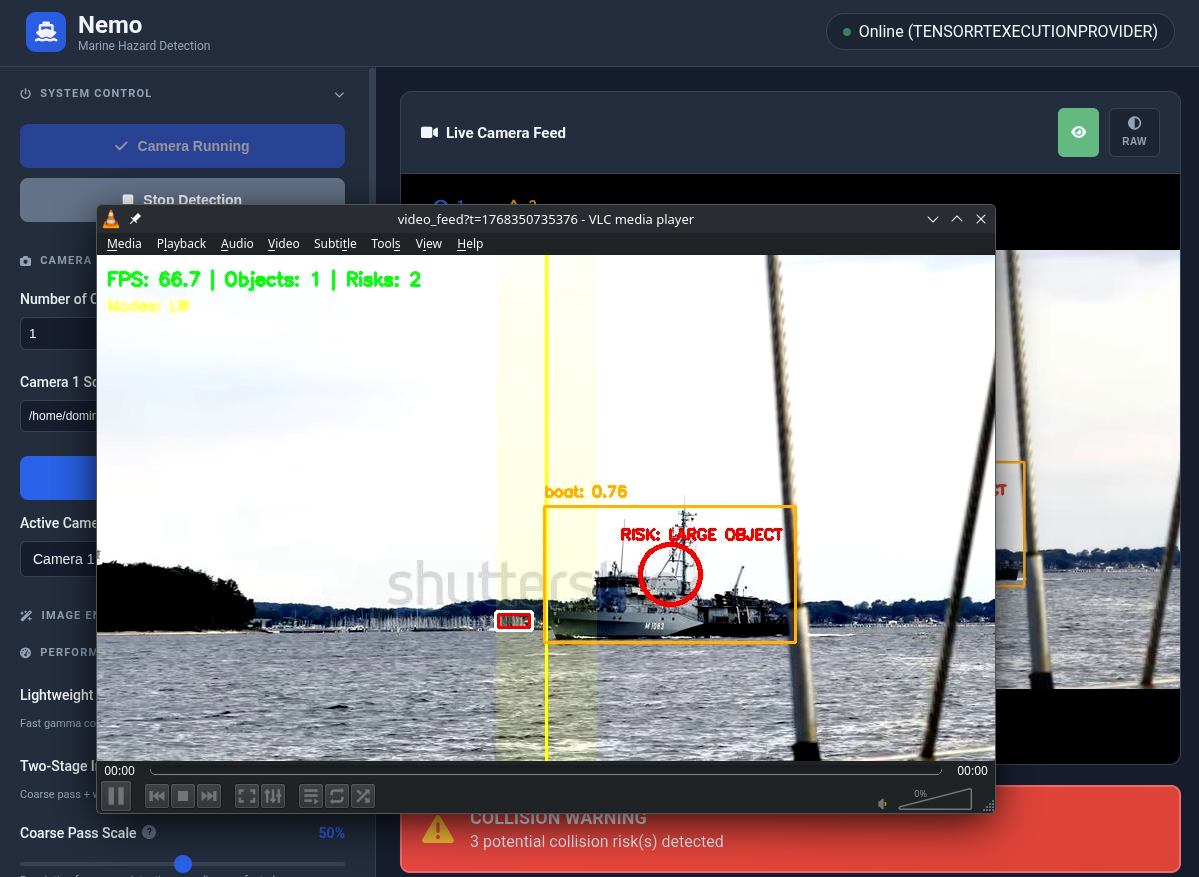
Feed Nemo any video source. Stream the detection output to any device or application.
Plug and play. Any USB webcam works — cheap or expensive. The AI adapts to whatever you have.
Connect network cameras, RTSP streams, or any streaming video feed. Position sources anywhere — wired or wireless.
Local video files, CSI cameras on Jetson, or onboard vessel camera systems. If it outputs video, Nemo can process it.
Nemo outputs the processed detection feed as a stream you can consume from any device or application. Open the web dashboard in a browser, or copy the stream URL and play it in VLC (Open Network Stream), OBS, or any media player that supports network streams.
Access from your phone, tablet, laptop, chart plotter, or a TV mounted at the helm — just navigate to http://127.0.0.1:5001
Connect Nemo to your existing systems for automation and extended control
Receive collision alerts as notifications. Trigger automations — flash deck lights, sound the horn, or control any connected device when a warning fires.
Compatible with AnythingLLM, LangFlow, and other open AI platforms for extended voice control and natural language interaction.
With the optional pre-flashed SD card (+$150), the Jetson creates its own WiFi hotspot on boot. Connect any device directly — no existing network, no Linux command line, no configuration needed.
Everything runs locally on your hardware. No cloud, no internet, no data leaving your vessel. Complete privacy and control.
Full programmatic control over every aspect of the system
Nemo exposes a local REST API on port 5001. Control detection, read status, adjust configuration, switch cameras, and stream video — all from simple HTTP requests. Build your own dashboards, integrate with automation platforms, or script your entire workflow.
http://127.0.0.1:5001
Start the detection loop. Optionally pass a video source (camera index or RTSP URL) to switch input before starting.
Stop the detection loop.
Returns current system state — detection count, FPS, active collision risks, execution provider, and per-object details.
Read the full configuration object including confidence thresholds, preprocessing flags, and risk parameters.
Update one or more configuration values at runtime. Only include the keys you want to change.
MJPEG stream of the live detection feed with bounding boxes and risk overlays. Embed in an <img> tag or consume in VLC/OBS.
List all configured camera sources and the currently active camera index.
Switch to a different camera. If detection is running, it restarts automatically with the new source.
Trigger the audio alarm manually. Verify speaker and alarm audio are working correctly.
Enable or disable debug mode. Adds diagnostic overlays to the video feed for troubleshooting.
curl -X POST http://127.0.0.1:5001/start \
-H "Content-Type: application/json" \
-d '{"video_source": 0}'
curl -X POST http://127.0.0.1:5001/start \
-H "Content-Type: application/json" \
-d '{"video_source": "rtsp://192.168.1.50:554/stream"}'
curl http://127.0.0.1:5001/status
{
"running": true,
"device": "CUDAExecutionProvider",
"detections": 3,
"risks": 1,
"fps": "26.4",
"total_reflections_filtered": 12
}
curl -X POST http://127.0.0.1:5001/config \
-H "Content-Type: application/json" \
-d '{"lightweight_mode": true, "horizon_position": 0.3}'
curl -X POST http://127.0.0.1:5001/switch_camera \
-H "Content-Type: application/json" \
-d '{"camera_index": 1}'
<img src="http://127.0.0.1:5001/video_feed" />
curl -X POST http://127.0.0.1:5001/test_alarm
What's under the hood
| Specification | Detail |
|---|---|
| AI Model | Custom maritime RT-DETR, TensorRT-optimized |
| Object Classes | Vessel, Person, Swimmer, Jet Ski, Buoy, Debris |
| Processing Speed | 30-60 FPS (hardware dependent) |
| Detection Accuracy | 95%+ in typical maritime conditions |
| Supported Hardware | NVIDIA Jetson Orin Nano/NX, laptops with NVIDIA GPU |
| Video Input | USB cameras, IP cameras (RTSP), streaming feeds, local sources, CSI, onboard systems |
| Video Output | Web dashboard stream — viewable in browser, VLC, OBS, or any network stream player |
| Multi-Camera | Yes — independent detection per camera, consolidated alerts |
| Dashboard | Web-based, accessible from any browser on local network |
| Internet Required | No — fully offline operation |
| Distribution | Standalone package — no Python, no Docker, no dependencies |
| Updates | 1 year included with license |
Check if your hardware is compatible for free, or go straight to purchasing a license.